

In most hospitals Yalantis works with, revenue loss rarely comes from one major issue. Instead, it’s the result of dozens of small breakdowns across intake, clinical workflows, and billing.
A missed step at intake, a prior auth request that’s submitted too late, or a claim delayed because two systems didn’t sync when they should’ve.
For sure, each of these issues on its own might not seem like a big deal. But when they happen across hundreds or thousands of claims every week, the impact adds up. You may notice that denials increase. Payments slow down, or, unfortunately, get lost entirely.
We’ve seen this play out in many healthcare systems. And the truth is, the solution isn’t a shiny new dashboard or one more tool sitting off to the side. Instead, it’s automation that works within your current process, catching these problems before they cost you.
So, what you’ll learn from this article (based on what’s working inside real hospital workflows):
- What actually causes most denials, and how to avoid them
- Where RPA fits in, and where it falls short
- Practical automation wins you can implement quickly
- Step-by-step path to build automation around the way your teams already work
Looking to explore automation opportunities in your healthcare organization?
Let’s talk about what’s possible.
Why claim denials are a major revenue drain for healthcare organizations
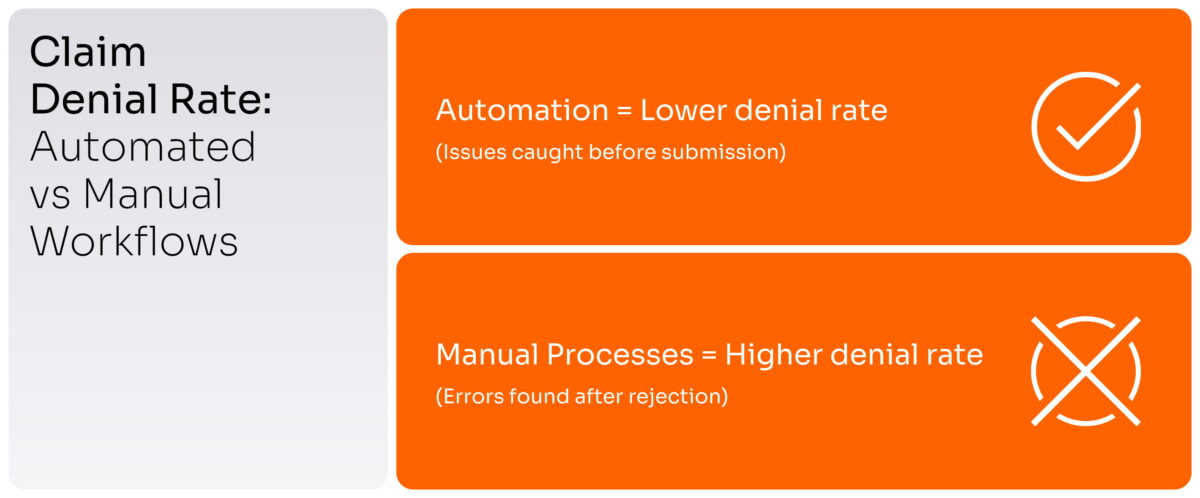
Let’s talk about something that quietly eats into hospital revenue: claim denials.
They rarely grab attention, but their impact is steady. Across the industry, denial rates often fall between five and ten percent, depending on the payer mix and how workflows are structured. Even at the lower end, the financial hit adds up quickly, especially for hospitals processing thousands of claims each week. Beyond the direct write-offs, high denial rates also show up as staff overtime, back-and-forth with payers, and slower cash flow, all of which make it harder for finance and operations leaders to plan ahead with confidence.
Some of those denials can be recovered, but that recovery comes at a cost. In fact, reworking a single claim can take anywhere from 20 to 30 minutes and cost up to 25 dollars in labor. Others get written off completely. And in most cases, the root cause is never identified, which means the same preventable issues keep slipping through.
|
💡 Good to know |
So, where do denials actually start? Manual work is still deeply embedded in most revenue cycle workflows, long before a claim ever reaches the billing team. Common triggers include:
- Eligibility wasn’t verified or wasn’t updated.
- Authorizations weren’t obtained on time (or weren’t submitted at all).
- Coding errors due to missing or inconsistent documentation.
- Claims sent late, or submitted with incomplete information.
These aren’t random slip-ups. They’re operational issues, and they show up every day.
In addition, it’s easy to treat denials as isolated billing problems. But most originate before the claim even reaches the billing team.
For example:
- A front desk team inputs outdated insurance details.
- A prior authorization gets delayed because intake and clinical workflows aren’t aligned.
- A provider forgets to finalize a note, leaving documentation incomplete for coding.
You should know that behind every denied claim, there’s usually a bigger story. It often points to bottlenecks, data silos, disconnected systems, and manual workarounds. These issues don’t always show up on dashboards, but they’re written all over your denial data.
That’s why, for CFOs and COOs, it’s crucial to find out why it’s happening, and what that says about the way the organization is running.
What RPA and workflow automation mean in the context of revenue cycle management
Let’s start with RPA.
RPA (Robotic Process Automation) is software that automates repetitive, rule-based administrative tasks that humans usually do on computers. In healthcare, RPA is mostly used on the business/operations side (not clinical care!). You can think of RPA as a digital employee that clicks, types, copies, and pastes across systems.
In the context of the revenue cycle, RPA is often used to:
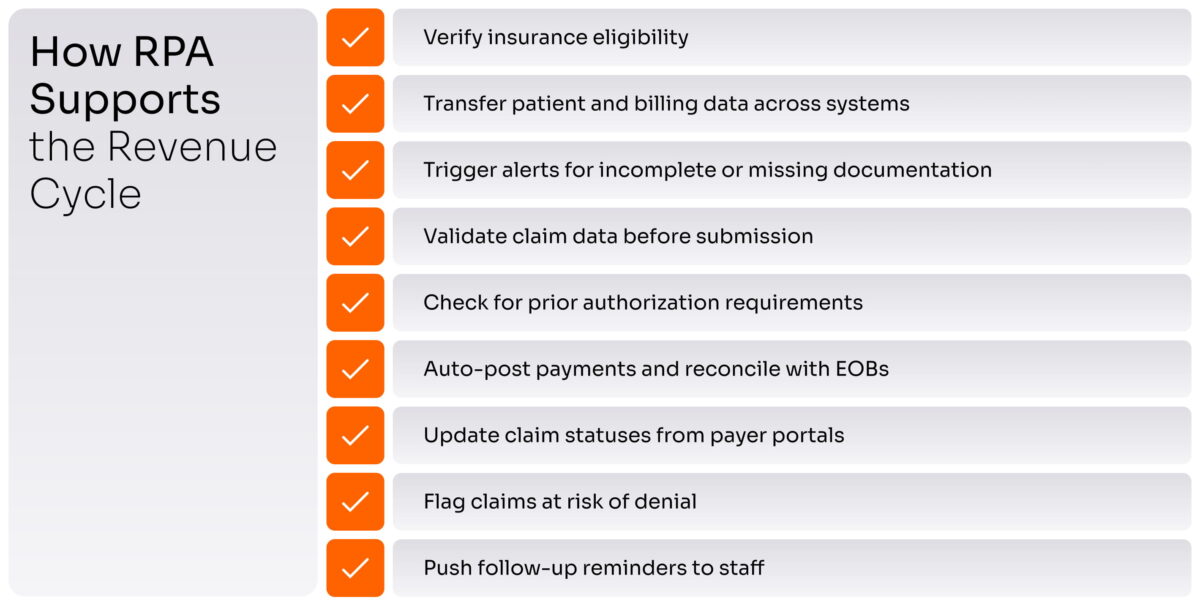
It can reduce manual load and help prevent basic data errors. But its value is limited when it operates on its own.
That’s why automation shouldn’t just fix today’s issues but also lay the groundwork for what’s ahead. In fact, by building automation that supports FHIR (Fast Healthcare Interoperability Resources) standards, you’re setting up your systems for secure, seamless data exchange across platforms. This is especially important as more payers and regulators start expecting FHIR-based data exchange by default, not as a “nice-to-have”. This kind of interoperability is quickly becoming the standard for how healthcare will operate in the future.
|
💡 Quick refresher: What is the revenue cycle? At its core, the revenue cycle is the full journey from the moment a patient registers to the moment the final payment comes in. That includes everything from intake and insurance checks to authorizations, documentation, coding, claim submission, and follow-up. |
Let’s explore why most RPA implementations fail in healthcare.
You have to know that standalone bots don’t fix broken workflows. In fact, they often add more complexity when used in isolation.
Here’s why they often fall short. They struggle with exceptions, and they don’t connect well with EHRs or clearinghouses.
This is especially relevant in the U.S. healthcare market, where systems like Epic and Cerner dominate. Automation must integrate not just technically, but also in a way that aligns with CMS billing regulations and documentation standards. Otherwise, even a well-automated workflow can fall short in real-world hospital environments.
So, let’s sum up: if you’re spending more time maintaining bots than getting value from them, you don’t have automation. Instead, you have a distraction.
Why denials happen, and which ones automation can reduce
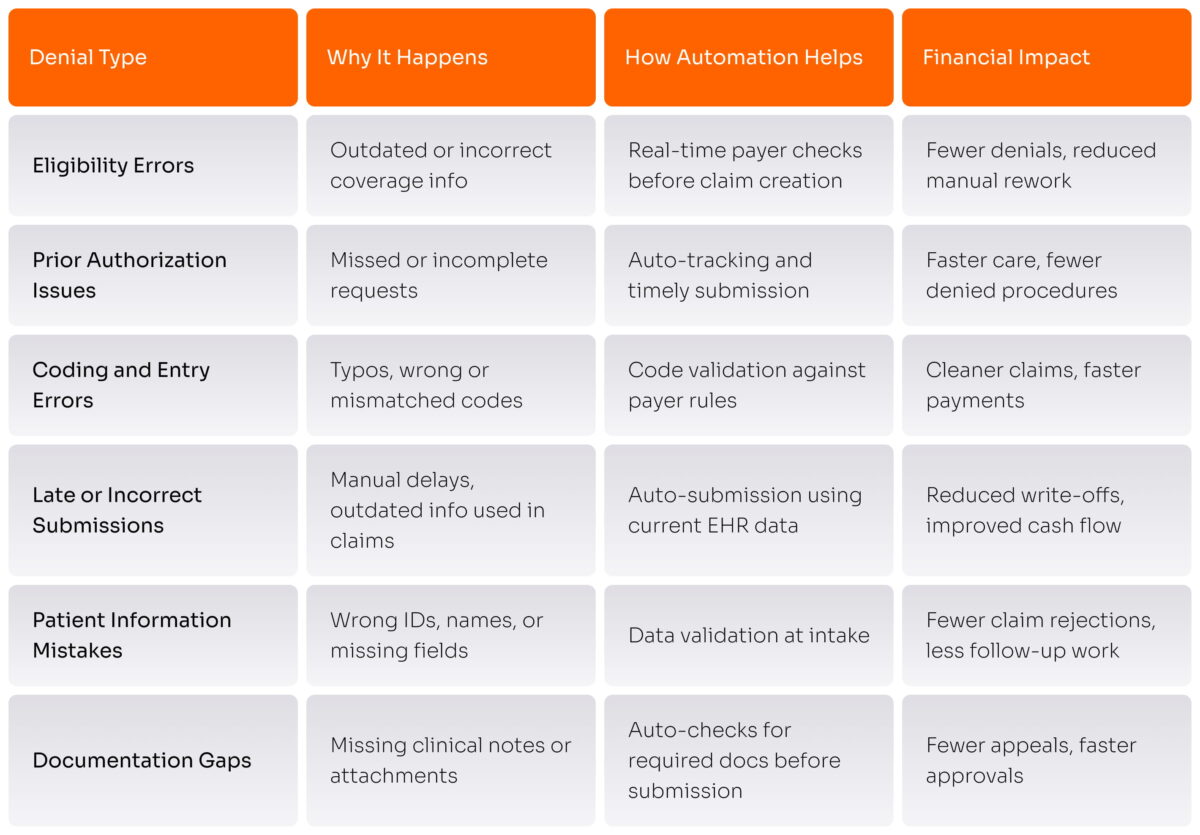
Here are the denial types where automation tends to make the most noticeable impact.
1. Eligibility and insurance verification errors
Let’s start with eligibility checks. If a patient’s insurance coverage isn’t verified correctly during registration, the claim will likely get denied. This often happens because staff don’t have time to check every detail, or because the data is pulled manually from payer portals.
Automation handles this in the background. It checks eligibility right away and flags any issues. So claims only go out when coverage is confirmed. That means fewer denials, fewer phone calls, and less wasted time.
2. Prior authorization delays and incomplete requests
Prior authorizations are another common roadblock. Each payer has different rules. Some require approvals. Some don’t. When staff have to track this manually, it’s easy to miss something. Requests may be sent late, or without the right documents.
With automation, that tracking is built in. It knows what’s required, fills in the details from the EHR, and sends the request on time. Obviously, that reduces delays and stops denials tied to missing prior auths.
3. Coding and data entry issues
Coding errors are also a frequent cause of denials. It only takes one wrong number or missing field for a claim to be rejected. Sometimes the issue is with documentation. Sometimes it’s just a manual mistake.
Automation catches these issues before the claim goes out. It checks that the codes match the documentation and follow payer rules. That keeps your denial rate down and saves your team from cleaning up rejected claims.
4. Late or incorrect claim submission
Then there’s timing. If a claim goes out late (or pulls in old data by mistake) it often gets denied. And let’s face it: manual processes are slow. They depend on someone remembering to hit “submit” at exactly the right moment.
In this case, automated claim submission can help keep the process moving. It pulls in fresh data and gets claims out on time. As a result, payments come in faster and write-offs go down.
5. Missing or inaccurate patient information
Wrong patient info is another problem. Even small mistakes, like a wrong birthdate or misspelled name, can cause a claim to bounce. And with data flowing through multiple systems, things don’t always sync up.
Automation checks this upfront. It makes sure patient details match payer records before a claim is created. That stops rejections and cuts down on rework.
6. Incomplete documentation or lack of medical necessity proof
Finally, documentation gaps. Sometimes the care was necessary, but the proof isn’t there. Notes are missing. Files aren’t attached. The payer doesn’t have what it needs to say yes.
Automation looks for what’s required. If something’s missing, it flags the issue before submission. That helps you avoid denials, reduce appeals, and get paid faster.
A great example here is Remote Patient Monitoring (RPM). While it can drive significant revenue, it’s also prone to denials if the required proof isn’t submitted. Payers, especially in the U.S., expect strict documentation, like verified device usage over multiple days and logged staff involvement, as seen with CPT codes 99453 and 99454.
With automation in place, patient IoT device data can sync directly with your billing system. Once a patient hits the required usage (for example, 16 days of transmitted data), the correct billing code is automatically triggered and closed. That turns what used to be a manual, risky process into a reliable, denial-resistant workflow.
|
💡 Pro tip We recommend to start with the denial types that happen the most, and follow clear rules. These are the easiest wins for automation and usually bring the highest return. In many hospitals, just targeting these top denial categories already creates a noticeable drop in rework and a visible bump in monthly cash collections. |
How RPA and automation improve revenue cycle efficiency
We’ve looked at where automation can reduce denials. Now, let’s take a step back and look at the bigger picture: what actually changes when the right automation is in place?
Here’s what healthcare providers typically see once automation becomes part of their revenue operations:
- Claims get submitted faster—with fewer errors → Manual delays and rework drop as data flows automatically between systems.
- First-pass acceptance rates go up → Validation rules and real-time checks ensure cleaner claims from the start.
- Avoidable denials decrease → Issues like expired eligibility, missing documentation, or coding mismatches are flagged before they cause rejection.
- Staff spend less time on low-value tasks → Teams no longer need to chase status updates or copy data between screens.
- Documentation improves naturally → Required fields get auto-filled, and missing data is flagged early—so fewer claims are held up for review.
- Cash flow becomes more predictable → With fewer billing issues and faster payments, revenue timelines are easier to manage.
|
💡 Good to know |
How to implement healthcare automation in 7 clear steps
Automation is about fixing the invisible problems that cost healthcare organizations millions in revenue each year. But knowing where to begin is often harder than it looks.
Here’s how Yalantis recommends approaching automation in revenue cycle management. Step by step, based on what actually works.
Step 1. Start with a clear view of your current process
Before you automate anything, you need to understand what’s slowing you down.
Map your revenue workflows from end to end. Where are delays happening? Which teams are stuck repeating the same steps manually? Ask the people closest to the work. Billing specialists, intake staff, revenue managers. Their insights often reveal issues that reports alone don’t catch.
The truth is that a clear baseline can help you spot where automation will move the needle.
Step 2. Address compliance, privacy, and security early
Once you’ve mapped your process, the next step is protecting it.
In healthcare, automation can’t move forward without strong security. And while being “compliance-ready” sounds good, it’s not enough on its own. What really matters is building systems that can hold up under real audits. To do that, you need to set things up in a way that’s actually secure (not just on paper!). This includes practical safeguards like encrypting sensitive data, limiting access based on user roles, and keeping a clear record of every action taken in the system.
Whether the requirement is HIPAA, SOC 2, or internal policy, your automation should be solid and audit-ready from the start.
Step 3. Focus on the areas that generate the most friction
Now that you know where things break and what needs protecting, it’s time to prioritize.
Don’t try to fix everything at once. Start with the pain points that lead to denials, delays, or staff burnout. For most organizations, that means automating high-volume, rules-driven tasks, like eligibility checks, prior auth tracking, or documentation follow-ups. These are the areas where automation starts showing real returns, fast.
Not sure how to move from insight to action?
Yalantis helps healthcare teams find the real blockers in their revenue workflows and turn them into smart automation opportunities that drive results.
Step 4. Build solutions around how your teams already work
With clear priorities, the next move is designing the right solution.
In practice, this is where off-the-shelf bots often fall short. Automation that’s too rigid will never stick. Instead, design tools that work the way your teams do now. Just faster and with fewer errors.
Yalantis recommends using a flexible mix of RPA, workflow logic, and integrations, all shaped around your internal processes. That way, automation fits into your operations without forcing major change.
Step 5. Connect automation to the systems that matter most
The best workflows break down when systems don’t talk to each other. That’s why integration is critical. Your automation needs to move across EHRs, billing software, payer portals, and clearinghouses, without losing data or triggering manual work.
This isn’t just about speed. It’s about maintaining the integrity of your revenue data at every touchpoint.
Step 6. Pilot with the real workflows
Before you roll out automation across departments, test it where it matters most. Run it through your actual revenue workflows. Use real patient scenarios and real claim data. That’s how you catch the gaps you didn’t see coming. Maybe it’s a missing code. Maybe a system handoff doesn’t work. Or something just takes longer than expected.
Testing in real conditions helps make sure your automation can handle the real-world pressure.
Step 7. Scale with control, not speed
Once the pilot works, don’t rush.
Rolling out automation across your healthcare system calls for careful planning. Start by assigning clear ownership of each workflow. Set guidelines for how updates will be handled. Put a support plan in place so your team knows what to do if something needs fixing.
Having this foundation makes sure your automation continues to run smoothly and bring real results as it expands.
Why choose Yalantis for healthcare automation
What’s obvious is that hospitals don’t lose money once a year. They lose it gradually, day by day, as delays, manual errors, and disconnected systems quietly drain revenue and make denials feel like an everyday reality.
Yet RPA can meaningfully change this. Still, the real value shows up when automation is designed to match the way your processes already work. It steps in before mistakes happen. It keeps workflows moving across intake, billing, and everything in between.
That’s the kind of automation we build at Yalantis.
Here’s what sets us apart:
- End-to-end RPA consulting and delivery
- Custom automation solutions built around your workflows
- Secure engineering aligned with HIPAA, HITECH, and NIST
- Proven experience integrating with EHRs, billing systems, and clearinghouses
- Scalable workflow automation frameworks tailored to healthcare needs
- Long-term partnership, not one-off bot installation
Our engineers, architects, compliance specialists, and integration leads work side by side to keep the process smooth from start to finish. If that’s the kind of partner you’re looking for, let’s talk.
Let’s plan your 3-year automation roadmap and build around what matters most.
FAQ
Does RPA replace medical billing specialists?
No. RPA handles the routine admin work. Billing specialists still manage decisions and edge cases. It’s a support tool, not a replacement.
How long does RPA implementation take?
It depends on the use case. For targeted workflows like eligibility checks, it can be up and running in a few weeks. Starting small usually delivers the best early results.
What systems can RPA integrate with?
Most tools your team uses every day. That includes EHRs, billing platforms, clearinghouses, or payer portals. If a human can navigate it, RPA likely can too.
Do I need to change my EHR or billing software to use RPA?
Not at all. RPA works with what you already have. It connects across systems without forcing big platform changes.
How does RPA handle HIPAA compliance?
RPA can be set up to support HIPAA and SOC 2 requirements by helping keep patient data secure. This usually means encrypting sensitive information, restricting access to the right people, and keeping clear records of system activity. These features don’t replace your compliance program, but they do make it easier to stay on track with HIPAA and feel prepared for audits or security reviews.
Is RPA suitable for small or mid-size healthcare organizations?
Yes. You don’t need a massive setup to benefit. Even smaller providers can automate high-friction tasks and see real financial and operational gains.
Does Yalantis build bots?
Not really. We don’t sell standalone bots. What we do is build automation that fits into your existing systems and workflows. That means working with your EHR, billing software, clearinghouses, and payers. It’s all designed around how your teams already work, not some generic template. The point isn’t to cut jobs. It’s to take repetitive tasks off your staff’s plate so they can focus on what actually needs their attention.